
Retail & Merchandise Planning Software, now with AI
Plan sales, margin, stock and budgets in Excel on one governed system. Ask Claude or ChatGPT about your live plans and stay in control of every change, with your QuickApp permissions in place.
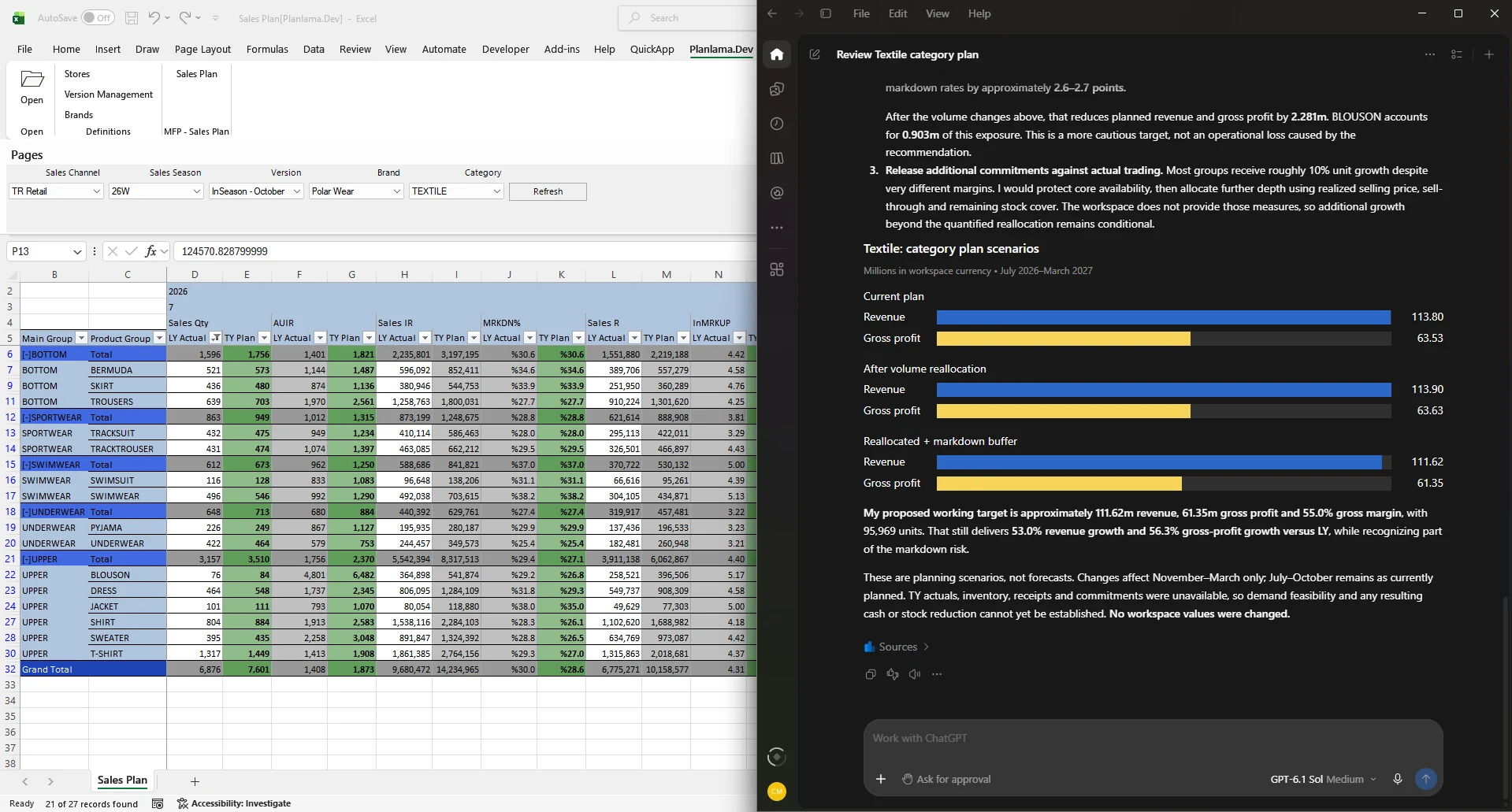
QuickApp AI in ChatGPT Desktop, reviewing a live Textile plan in Excel and proposing revised targets.
Trusted by leading retailers


Ask your plan. Approve the change.
Planning raises questions that cut across views, seasons and levels of detail. With QuickApp AI, planners ask them in plain language, in the AI assistant they already use, and move straight on to the next question or the change it calls for.
Ask
Ask in plain language. The assistant opens the workspace you need, even one that is not loaded yet, chooses the application and sets the page selections.
Analyse
It works with the data loaded in your workspace, the same view you see. When the question needs more, it changes page selections and loads other pages too. Totals follow QuickApp's own rules, including formula metrics.
Prepare and approve
Ask it to build or revise a plan. It prepares the entries through QuickApp, checked against your application's rules. You review them in Excel and apply all, some or none.
Beyond the screen: AI Datasets
When the answer needs data that is not on any screen, the assistant can query the reporting cubes your planners already use, through AI Datasets your administrator opens to AI. Questions at any level of detail, without building a new report.
Your QuickApp permissions apply to every request. Works with the Claude and ChatGPT desktop apps on Windows, right next to Excel. How QuickApp AI keeps you in control →
What is QuickApp?
QuickApp is a low-code enterprise planning platform delivered as a Microsoft Excel add-in. Planners work in the Excel interface they already know, while data, calculation rules, approvals and permissions live in your database. Each planning system is modelled around the customer's organization, not a fixed template.
Explore the platform →Model
Define planning data structures, rules, metrics and responsibilities around your business.
Build fast
Low-code screens are generated from the model, cutting delivery from months to days.
Connect
Work with MS SQL Server, Oracle, ERP systems such as Nebim, and your data warehouse.
Adapt
Screens and workflows evolve as teams and market needs change, without a rebuild.
From financial targets to SKU-level execution
MFP sets where you want to go. MAP decides how you get there. QuickApp connects both in one platform.
Merchandise Financial Planning
Sales, intake and stock budgets, OTB control, margin targets and in-season re-forecasting by brand, channel and product group.
Ask: "How did sell-through by category compare across the last three seasons?"
Learn more → MAPMerchandise Assortment Planning
Option, range and item plans: how many options per store, which price architecture, and what to buy at SKU level and when.
Ask: "Which options sold through slowest last season?"
Learn more → FP&AFinancial Planning & Analysis
Sales and cost, OPEX, CAPEX and purchases rolled into P&L, balance sheet and cash flow under Local GAAP and IFRS.
Ask: "Where are this quarter's expenses ahead of plan?"
Learn more →Also delivered on the platform: in-season management and store capacity planning.
Excel on the front end. A governed database behind it.
Planners keep the Excel they know. QuickApp runs the applications next to it and keeps every number in your own databases.
Familiar for planners
Filters, pivots and formulas work as they do in Excel.
One source of truth
Every entry is written to the database and stays traceable.
Control built in
Locking, spreading rules, submit and approval flows, and user permissions.
Scenario ready
Compare plan against actuals, versions and what-if scenarios side by side.
Proven in retail. Designed for each customer.
Planning systems running at Turkish retail leaders with large store networks and many brands.
Department storesBoyner manages merchandise financial planning for 100+ brands and thousands of product hierarchy nodes on QuickApp, and extended it with item planning on Oracle.
Global fashion retailAfter the first project, Koton's own teams went on to build new planning modules on QuickApp themselves.
Children's retailCivil started with merchandise financial planning and store capacity, then extended QuickApp to end-to-end assortment planning, integrated with Nebim.
See how a planning app is built
Step-by-step videos from the QuickApp team: from connecting a database to a working sales budget screen.
Frequently asked questions
Is QuickApp an Excel add-in?
Yes. Users plan inside Microsoft Excel on Windows, while all data, rules and permissions are stored in your database rather than in files.
Which databases and systems does it connect to?
QuickApp works with Microsoft SQL Server, Oracle, PostgreSQL, MySQL and MS OLAP, and integrates with ERP systems such as Nebim and with data warehouses.
Is it a fixed, off-the-shelf product?
No. MFP, MAP and budgeting are solution areas built on the platform. Each implementation follows the customer's hierarchy, metrics and approval flow.
Can our own team build and change screens?
Yes. QuickApp is low-code: teams with database knowledge can add metrics, screens and procedures themselves.
Which AI assistants work with QuickApp AI?
The desktop apps of Claude and ChatGPT, as well as Claude Code, Codex, VS Code and Cursor. Browser versions are not supported, because the connection runs on the user's computer next to Excel.
Does our data go to the AI provider?
Your data is never copied in bulk to the AI provider. For each question, the assistant receives only the results it needs, and only data the user is allowed to access.
Can the AI change our plans?
The assistant prepares changes through QuickApp, which checks them against the application's rules. After you approve the request in the assistant, QuickApp shows the changes in Excel, and you apply all, some or none of them. The assistant saves, discards or deletes records only when you ask it to.
Can the assistant answer questions that are not on any screen?
Yes. Administrators can define AI Datasets on your SQL Server Analysis Services cubes. The assistant then queries them directly, so planners can ask about the same data they use for reporting.
Let's design your planning system
In 30 minutes we map your current planning pain points and discuss a practical first scope. See QuickApp AI with your own plans.