
Why AI-Assisted Retail Planning Still Needs Human Approval

AI can shorten the path from a planning question to a proposed action. A planner can use it to explore a performance gap, compare scenarios and prepare a possible revision without navigating every view and assembling every calculation manually.
But answering a question and changing a live retail plan are not the same kind of task.
A plan revision can affect sales, units, margin, intake, stock and open-to-buy. A change at one hierarchy level may need to be distributed across several levels below it. Some values may be locked, some may be calculated, and others may be editable only under specific conditions. The data can explain part of the decision, but supplier constraints, commercial priorities and recent market knowledge may still sit with the planner.
For that reason, the most useful role for AI is not to replace approval. It is to make the work leading to a decision faster and more informed while keeping responsibility for the final action clear.
Analysis and action carry different risks
Consider two requests:
Which categories are furthest behind budget this season?
and:
Increase the full-season sales plan for those categories by five percent.
The first request produces information. If the scope is wrong, the planner can correct the question and run the analysis again.
The second request changes a shared business plan. Its effects may flow into purchasing, inventory, finance and management reporting. Even if the requested calculation is simple, the operational consequences may not be.
This distinction is useful when designing any AI-assisted planning workflow:
- Read-only analysis can usually be exploratory.
- Proposed changes should be prepared without being applied silently.
- Plan entry should require a review of scope and impact.
- High-impact or broad changes may justify additional approval rules.
The level of control should follow the consequence of the action, not the confidence of the wording used by the AI assistant.
What can go wrong without an approval layer?
An AI suggestion can be reasonable and still be wrong for the planning context. Common risks include the following.
1. The request uses the wrong scope
The planner may intend to change one season, version, channel or region while the active context contains another. A natural-language request can sound complete even when an important filter is implicit.
Before applying a change, the user should be able to confirm exactly which planning slice is affected.
2. A valid total is distributed incorrectly
Changing a category total often means spreading that value across brands, stores, weeks or items. Several distributions can produce the same total, but they do not produce the same commercial plan.
The planning application’s spreading rules should therefore remain active, and the resulting lower-level values should be reviewable.
3. Connected metrics move unexpectedly
Sales value, units, average price, margin, stock and intake are often connected. Increasing one value can change several others through formulas or related calculations.
A planner needs to see more than the value explicitly mentioned in the request. The review should expose the metrics materially affected by the proposed change.
4. The data does not contain the full business context
A plan may need to reflect a delayed delivery, a supplier negotiation, a campaign decision or a local store issue that has not yet reached the data warehouse.
AI can work with available information, but the planner may know why an apparently logical recommendation should not be applied.
5. Automation bypasses existing controls
If an AI connection creates a separate path around permissions, locked values or application rules, it weakens the planning system instead of improving it.
AI-assisted actions should operate through the same controls as actions performed directly by the user.
Six requirements for a useful approval layer
Human approval should not be a generic confirmation box. To support a real planning decision, it should provide enough information for the user to understand what will happen.
1. Clear scope
The review should identify the application, plan version, season, channel, hierarchy members and other selections used to prepare the change.
2. Current and proposed values
The planner should see the actual values that will change—not only an AI-generated sentence claiming that the plan has been updated.
3. Visible impact on related metrics
Where possible, the review should show important consequences for connected measures such as units, margin, intake or stock.
4. Partial approval
A useful proposal is not always correct in full. The planner should be able to approve some entries and reject others without rebuilding the entire request.
5. Rule-aware validation
Permissions, locked values, editable-field rules, hierarchy logic, spreading rules and formulas should be checked by the planning application. The AI assistant should not become a way to bypass them.
6. Traceability
The organization should be able to identify who initiated the change, which system prepared it and what was accepted or rejected. The appropriate audit detail will depend on company policy, but responsibility should not become less clear because AI was involved.
Approval should be proportional, not obstructive
Human-in-the-loop design is sometimes treated as a choice between complete automation and approving every minor step. That is an unnecessary trade-off.
A more practical approach is to match controls to risk:
- navigating to a workspace or changing a view can remain low friction;
- read-only analysis can be conversational;
- preparing a plan change can require confirmation of scope;
- applying values can require a row-level preview;
- large revisions, sensitive versions or final submissions can follow stronger authorization rules.
The objective is not to insert a person into every technical operation. It is to place a meaningful decision point before an action changes a governed business plan.
A practical scenario
Imagine that a planner is reviewing a season and wants to understand an emerging gap.
They begin with a read-only question:
Which product groups are furthest behind budget, and which stores are driving the difference?
After reviewing the result, they ask for a proposal:
Prepare a revised full-season sales plan for the two weakest product groups.
A well-designed workflow would not immediately write new values into the plan. It would first prepare the proposed entries and display the affected rows, current values, new values and relevant calculated effects.
The planner could then accept the revision for one product group, reject entries for stores affected by a local delivery issue and adjust part of the second proposal. AI reduces the work needed to assemble the revision, while the planner contributes the business context required to make it responsible.
A checklist for evaluating AI-assisted planning
Organizations considering AI for merchandise or financial planning can use the following questions:
- Does the assistant work with the live planning context or an uncontrolled export?
- Can users verify the exact scope before a change is applied?
- Are current and proposed values shown clearly?
- Are important related metrics visible during review?
- Can users approve only part of a proposal?
- Do existing permissions and planning rules still apply?
- Are locked or non-editable values protected?
- Is the action traceable after it is completed?
- Can the system decline or stop when a result cannot be calculated safely?
- Is only the data required for the task shared with the AI provider?
If these questions cannot be answered clearly, the organization may have an AI demonstration rather than an operational planning workflow.
How QuickApp approaches human approval
QuickApp AI follows the same principle: the assistant helps with navigation, analysis and preparation, while QuickApp remains the governed planning system.
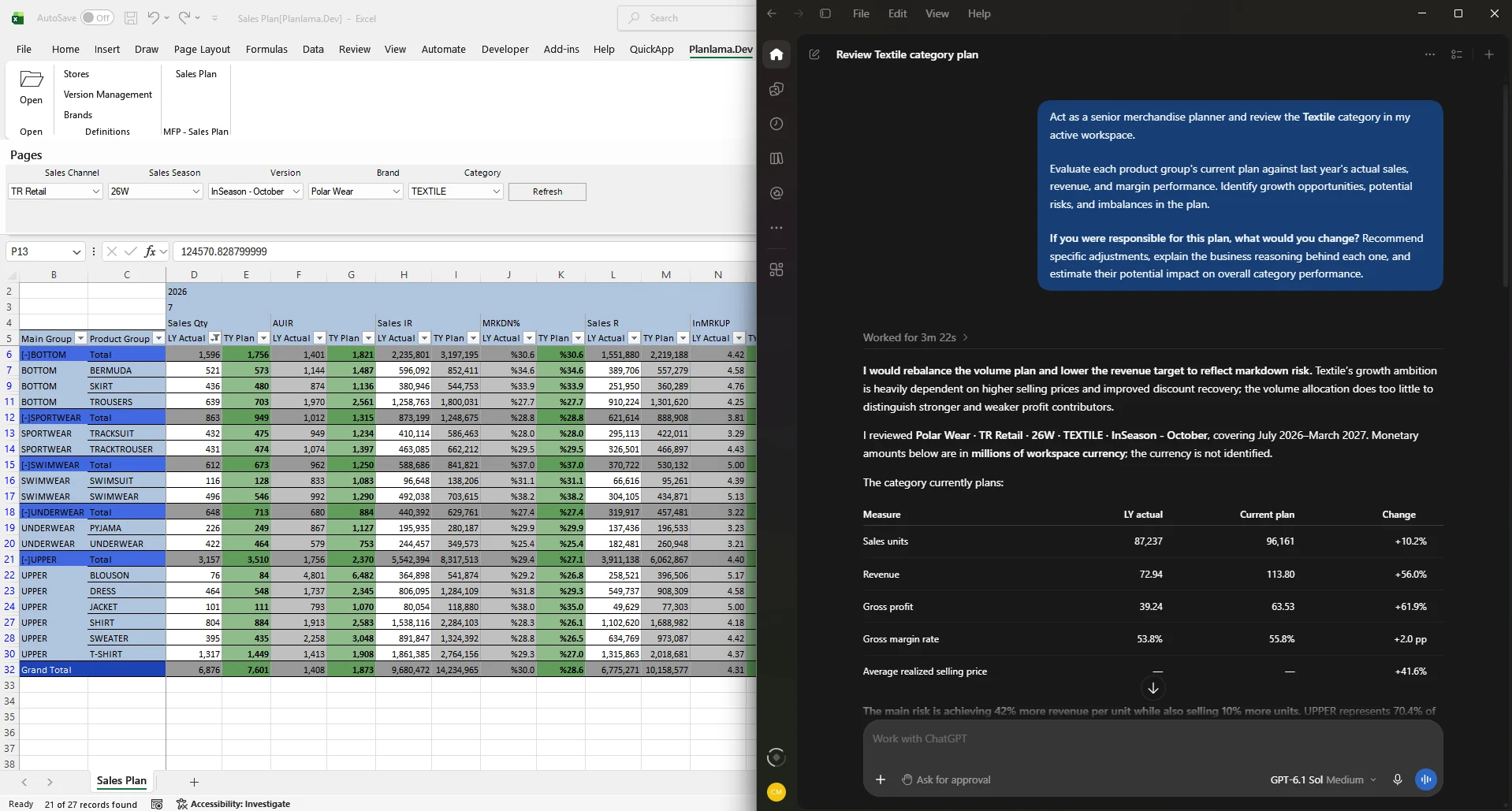
When a planner asks Claude or ChatGPT to revise a live QuickApp plan, the proposed entries are prepared through QuickApp and checked against the application’s rules and the user’s permissions. The planner then sees the affected rows, current and proposed values, and related metrics in Excel. They can apply all entries, select only some, or reject the proposal.
Existing controls—including permissions, locked cells, editability rules, formulas and spreading logic—remain part of the process. The objective is to reduce manual navigation and preparation without transferring the final commercial decision away from the planner.
To see this workflow with your own planning process, explore QuickApp AI or book a 30-minute discussion.
More articles

See QuickApp with your own plans
A 30-minute session with our consultants, built around your planning process.